A little room for better work
Give your day
a little rhythm.
Get the latest Flowloop build for your Mac.
Download for MacBefore you download
- Release
- Latest GitHub release
- Download
- FlowLoop.dmg
- Format
- macOS disk image
- Hosted on
- GitHub Releases
The DMG is not signed with an Apple Developer account.
Getting started
Opening Flowloop for the first time.
This build is not notarized by Apple, so macOS may block the first launch. Only choose Open Anyway if you trust the Flowloop download from the GitHub release linked above.
Install the app and try opening it.
Open FlowLoop.dmg, copy FlowLoop.app to your Applications folder, then open FlowLoop from Applications.
Allow FlowLoop in Privacy & Security.
If macOS blocks it, open System Settings → Privacy & Security. Scroll to Security and click Open Anyway beside the FlowLoop.app message.
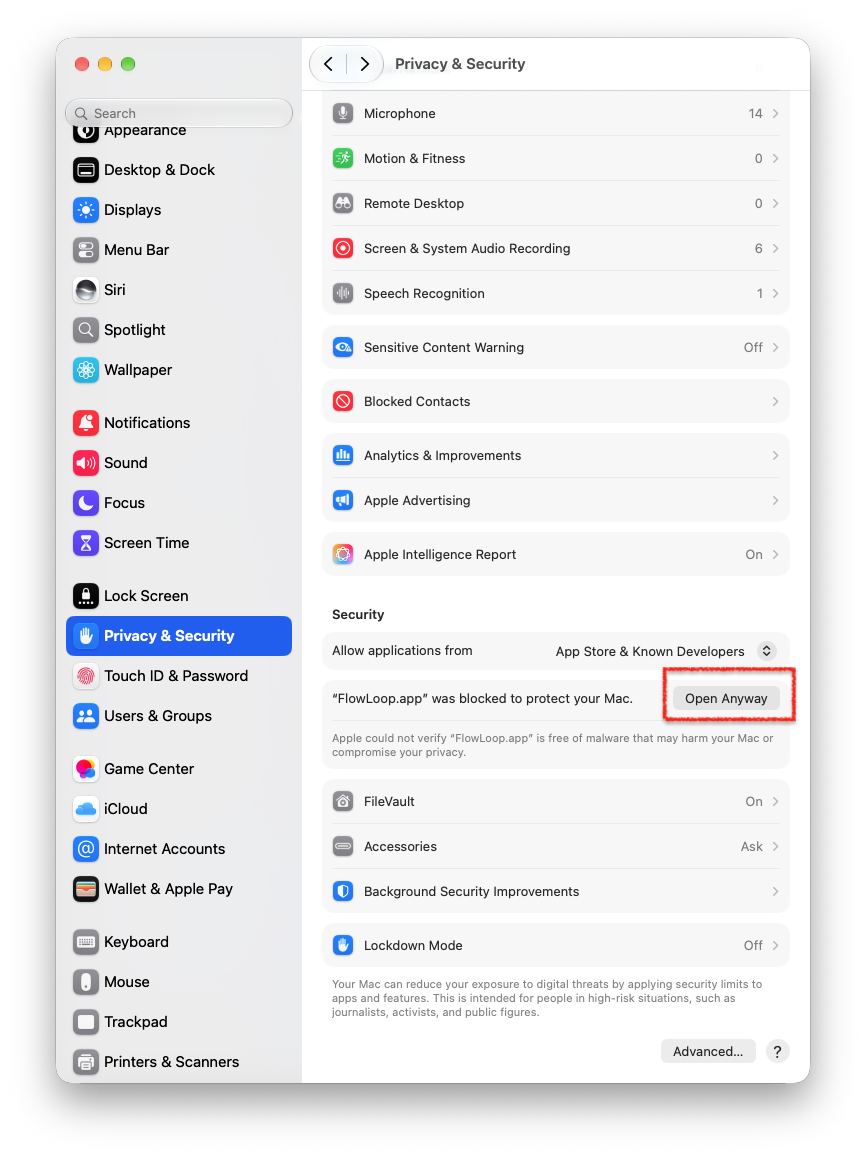
Choose Open Anyway beside FlowLoop.app. View full size ↗ Confirm that you want to open it.
In the confirmation dialog, choose Open Anyway. On some macOS versions, the button is labelled Open.
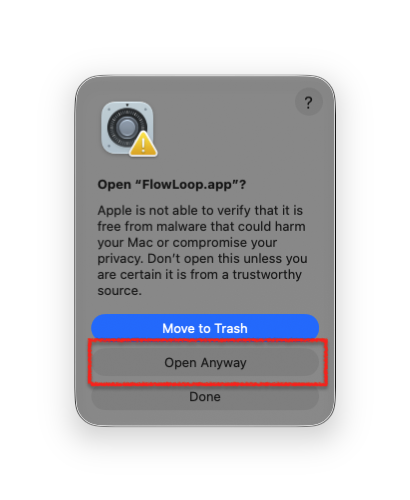
Confirm Open Anyway in the dialog. View full size ↗
After approval, you can open Flowloop normally from Applications. Apple’s guide to opening apps safely ↗